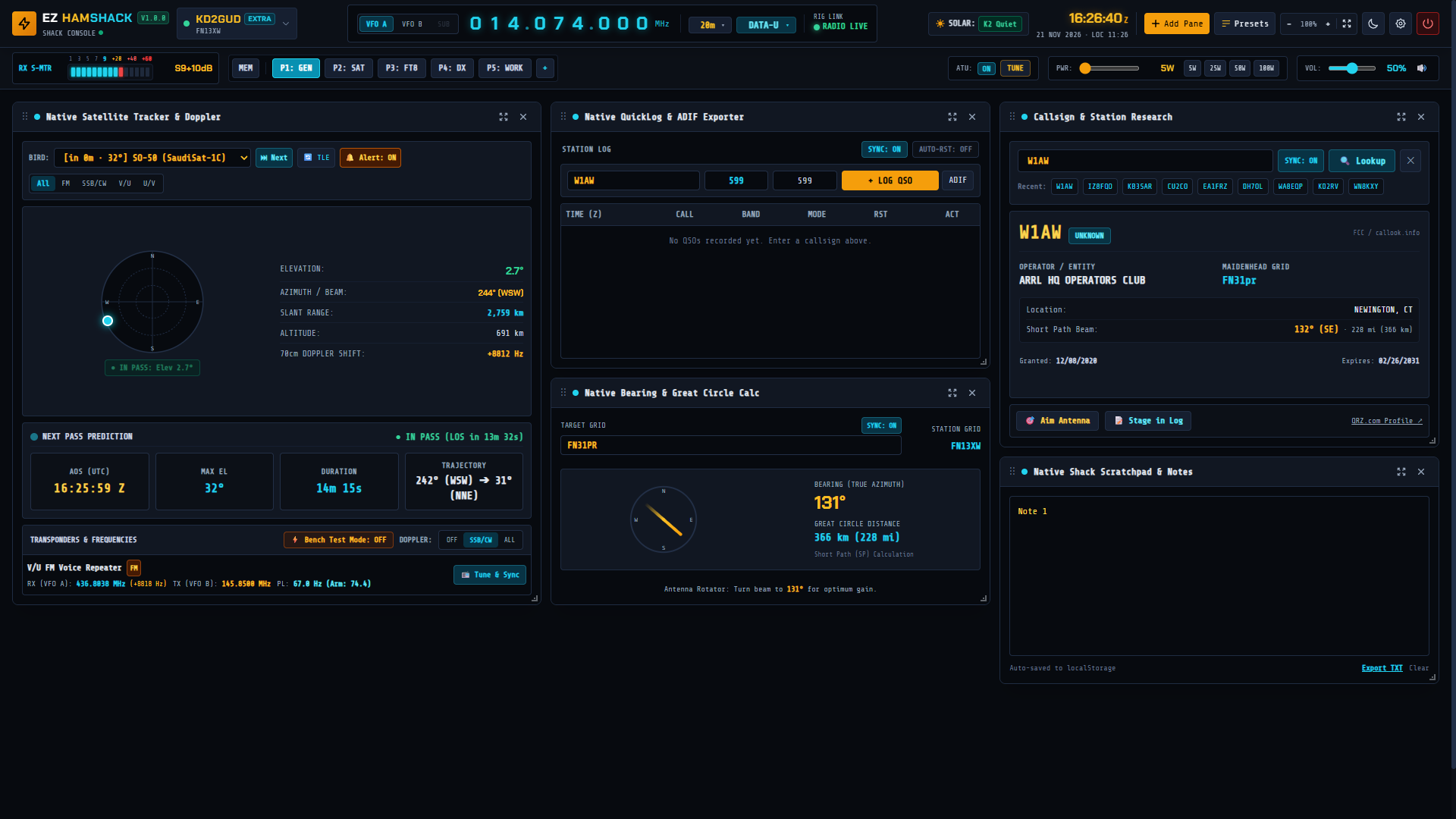
Consolidate satellite tracking, instant log synchronization, Callsign lookups, and bearing calculations into a single dark-mode dashboard—backed by a local, fast Python daemon. No cluttered windows, no compromises.
Native asynchronous Python serial driver (pyserial) featuring hardware-calibrated pacing and relay settling delays. Control your transceiver without relying on FLRIG or legacy intermediaries. A USB, serial, or USB to serial cable is required for direct CAT control. This cable was used to test the Kenwood TS-2000: Amazon Link
Compute SGP4 orbital propagation, view dynamic next-pass predictions, and monitor elevation, azimuth, and slant range using an SVG polar radar. Doppler tracking defaults to SSB/CW when engaged, with automated split and CTCSS tone management.
Integrated callsign verification utilizing FCC Callook and HamDB lookups alongside grid and zone tools. View location data, short-path beam headings, license statuses (Technician, General, Extra), and coordinates quickly.
Real-time sync with logs/shack_log.adi in standard ADIF 3.1.4 format for easy import into external logging software. Confirmation checks on destructive log actions help prevent accidental data loss.
Dynamic bearing calculation from target grid squares compared to your hometown locator. Visual compass headings verify short-path beam angles at a glance for your antenna rotator.
Stay on top of live solar metrics (SFI, SSN, A & K indexes), capture instant scratchpad notes stored in browser localStorage, and monitor FCC Part 97 band privilege edge boundaries by license class.
| Model | Status | CAT Engine | Dual-Watch / Sub-RX | Satellite Automation |
|---|---|---|---|---|
| Yaesu FT-991A | Supported | Native (38400) | N/A (Single VFO) | Automated |
| Yaesu FT-857D | Supported | 5-Byte Binary (38400, 8N2) | N/A (Single VFO) | Automated |
| Icom IC-7300 | Supported | CI-V (19200, 94h) | N/A (HF/6m) | HF/6m Split |
| Kenwood TS-2000 | Supported | Native (9600) | SUB VFO (2m/70cm) | Automated |
Download or Clone
Clone the repository using Git or extract the release ZIP onto your hard drive, then see Quick-Start.txt for Windows and Linux setup details:
git clone https://github.com/KD2GUD/EZHAMShack.git
cd EZHAMShack
Unblock & Run win-install.bat
Right-click win-install.bat and win-launcher.bat → Properties → check Unblock if needed, then double-click win-install.bat. It verifies Python 3.10+ (installing Python 3.12 via winget if missing), creates a dedicated virtual environment (.venv\), installs required libraries, initializes logs\shack_log.adi, and creates a desktop shortcut.
Launch via Desktop Shortcut or win-launcher.bat
Double-click your desktop shortcut or run win-launcher.bat inside the workspace folder. The CAT bridge starts and your default web browser opens with the dashboard.